
The UK’s National Cyber Security Centre (NCSC) announced this week at CYBERUK 2026 in Glasgow that it will no longer recommend passwords where passkeys are available. This is not a distant future plan — it is a change in official government guidance, effective now.
If your business uses Microsoft 365, Google Workspace, or any modern cloud platform, this affects how your staff log in. If you have a customer-facing website or app, it affects what login options you should be offering.
What is a passkey, and why should you care?
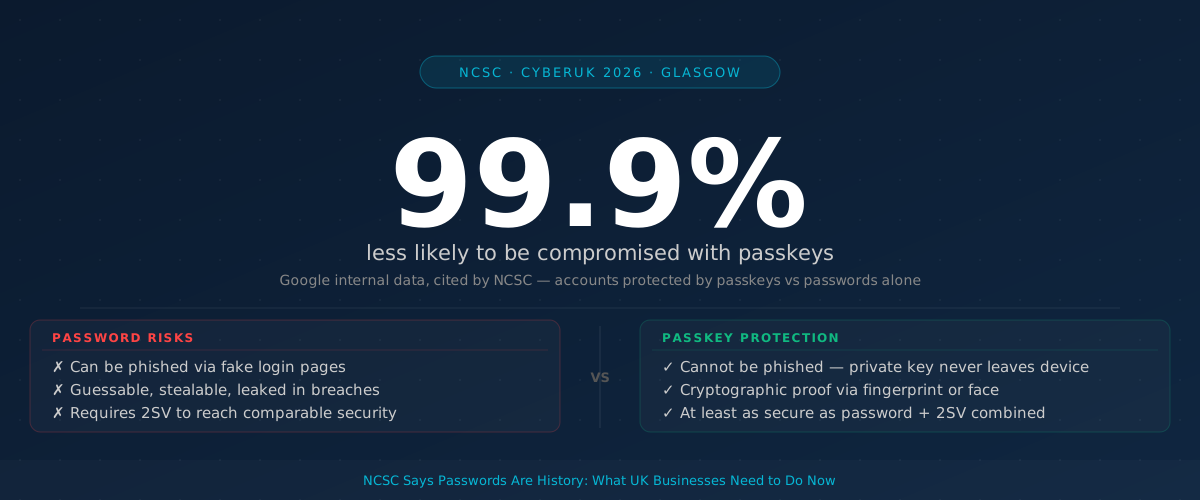
A passkey replaces your password with a cryptographic key stored on your device — your phone, laptop, or tablet. When you log in, your device proves your identity using that key, often confirmed by your fingerprint or face. Nothing is typed. Nothing can be guessed, stolen via phishing, or leaked in a data breach.
Accounts protected by passkeys are 99.9% less likely to be compromised than those relying on passwords alone. — Google internal data, cited by NCSC
Passkeys cannot be phished. A fake login page gets nothing from a passkey attempt, because the private key never leaves your device. That eliminates the most common way business accounts are taken over.
What the NCSC actually said
The announcement, made on day two of CYBERUK 2026, followed a new NCSC technical report comparing passkeys against passwords paired with two-step verification (2SV — the second code you enter after your password). The report found passkeys are at least as secure as that combination, and generally more secure.
The NCSC is now recommending passkeys as the default login option for consumer-facing services. For internal business systems, the advice is to adopt passkeys where your software supports it and continue using strong passwords with 2SV where it does not — the NCSC acknowledges that many organisations still run older IT systems that are not passkey-ready.
Microsoft is not waiting. In March 2026, Microsoft began automatically enabling passkey authentication across all Microsoft Entra ID tenants. If your business uses Microsoft 365 and has not customised your sign-in settings, passkeys may already be an option for your staff — or will be shortly.
A side-by-side comparison showing two login flows: left side labelled “Password login” with three steps — type username, type password, enter 2FA code — right side labelled “Passkey login” with one step — fingerprint or face scan on device. Arrow shows passkey is 8x faster.]
What this means for UK businesses right now
| Situation | Action |
|---|---|
| You use Microsoft 365 / Entra ID | Check whether passkeys are enabled — Microsoft is auto-applying defaults. Ask your IT support to verify your tenant settings. |
| You use Google Workspace | Passkeys are already supported. Enable them in your Admin console and encourage staff to register one. |
| You have a customer-facing website or app | The NCSC now recommends offering passkeys as a login option. Raise this with your web developer or platform provider. |
| You are pursuing Cyber Essentials certification | The 2025 update to Cyber Essentials officially recognises passkeys as a compliant access control. You no longer need legacy passwords to certify. |
| Your systems do not yet support passkeys | Keep using strong passwords plus 2SV. This remains the NCSC's recommended fallback — do not drop 2SV while passkey migration is pending. |
The practical benefits beyond security
Passkeys are faster. Logging in with a passkey takes up to eight times less time than entering a username, password, and a 2SV code. That adds up across a workforce.
They also reduce IT support costs. Organisations that have switched report a 32% drop in password reset tickets — one of the most common and avoidable drains on IT support time.
For businesses using SMS-based two-factor codes, passkeys can cut those costs significantly. Financial services firms have reported up to 90% savings on SMS authentication expenses after switching.
The UK is already ahead
Just over half of active Google users in the UK already have a passkey registered — the highest adoption rate in the world. Platforms your staff and customers use daily — Google, eBay, PayPal, and many others — already support them.
This is not a technology that needs years of development before it reaches your business. It is here. The NCSC’s announcement is the official signal that the transition has started.
Your next step
Ask whoever manages your IT — whether in-house or a managed service provider — to answer three questions this week:
- Are passkeys enabled (or being auto-enabled) on your Microsoft 365 or Google Workspace accounts?
- Do your staff know how to register and use a passkey on their work accounts?
- If you have a customer login portal, does it support passkeys yet?
You do not need to rip out your existing systems overnight. But ignoring this guidance now means playing catch-up while your staff remain unnecessarily exposed to phishing attacks that passkeys would stop outright.
Topics